使用 Foundry Local、Microsoft Foundry 与 Agent Framework 构建混合 AI(上):隐私优先的本地+云端协同

原文链接:https://techcommunity.microsoft.com/blog/azure-ai-foundry-blog/hybrid-ai-using-foundry-local-microsoft-foundry-and-the-agent-framework—part-1/4470813?WT.mc_id=AI-MVP-5003172
本文基于 Microsoft Tech Community 的一篇技术文章做中文整理与改写:在不牺牲云端强推理能力的前提下,尽可能把敏感数据留在本地设备上处理,仅把“安全、结构化、可最小化暴露”的摘要发送到云端模型,从而更好地满足隐私、合规和受监管场景的需求。
说明:文中涉及的“症状检查/分诊指导”等内容仅用于演示与信息说明,不构成医疗建议、诊断或治疗意见。
混合 AI:在受监管场景中实现“隐私优先”的可落地架构
混合 AI(Hybrid AI)正在快速成为真实世界应用中最实用的架构之一——尤其是在隐私、合规或敏感数据处理非常关键的场景。现在很多用户的笔记本或台式机都具备可观的 GPU 能力,同时小型、高效的开源语言模型生态也在迅速成熟,让“本地推理”不仅可行,而且更容易落地。
原文讨论的核心模式是:用 Agent Framework 构建一个“本地运行的智能体(agent)”,让它在需要强推理/规划时调用 Azure AI Foundry 里的云端模型(示例为 GPT-4o),但在处理原始敏感文本(例如医疗检验报告、法律文书、财务报表等)时改为调用 Foundry Local 在本机 GPU 上运行的小模型(示例为 phi-4-mini)。这样可以在不上传原始敏感数据的前提下,利用云端模型完成更高质量的推理与输出。
这套系列文章的 Part 1 重点放在“架构与基础”,通过一个简化的示例展示:本地推理与云端推理如何在同一个 agent 下协同工作。
演示思路
问题背景
很多人都有过类似经历:身体感觉不舒服、出现奇怪症状,或者体检/化验结果刚出炉,就会下意识把太多个人信息(姓名、出生日期、地址、医院信息、具体化验数值等)复制粘贴到某个网站或聊天机器人里,只想尽快得到答案。
原文用一个非常“说明性”的小场景(症状检查 + 化验报告摘要)来解释混合 AI 如何减少这种“过度分享”。它不是医疗产品,也不是临床方案,只是为了让模式更易理解。
借助 Microsoft Foundry、Foundry Local 与 Agent Framework,可以把敏感数据留在用户设备上本地处理,让云端负责“更重的推理”。离开设备的只有经过整理的结构化摘要;Agent Framework 负责在本地模型与云端模型之间做路由与编排,从而形成无缝、且更具隐私保护的混合体验。
Demo 场景
这个 demo 用一个简化的“症状检查器”来展示混合 AI 的流程:敏感数据在本地保持私密,同时依然能借助强大的云端推理。
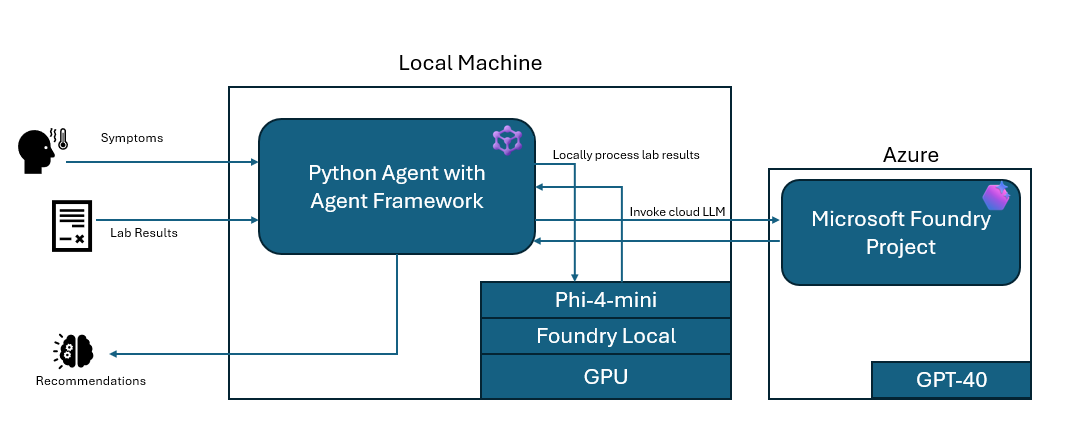
流程大致如下:
- 本地 Python agent(Agent Framework) 在用户设备上运行,并能调用云端模型与本地工具。
- Azure AI Foundry(GPT-4o) 负责推理与分诊逻辑,但不会看到原始 PHI/敏感文本。
- Foundry Local 在本机 GPU 上运行小模型(phi-4-mini),对原始化验文本进行本地解析与抽取。
- 使用工具函数(
@ai_function)将“本地模型推理”包装成 agent 可调用的工具;当 agent 检测到“像化验单的文本”时就会自动调用。 - 简化后的调用链可以概括为:
user_message = symptoms + raw lab text
agent → calls local tool → local LLM returns JSON
cloud LLM → uses JSON to produce guidance
环境准备
Foundry Local 服务
在带 GPU 的本地机器上,原文使用如下命令安装 Foundry Local:
PS C: \Windows\system32> winget install Microsoft.FoundryLocal
然后下载本地模型(示例选择 phi-4-mini)并做一个快速验证:
PS C:\Windows\system32> foundry model download phi-4-mini
Downloading Phi-4-mini-instruct-cuda-gpu:5... [################### ] 53.59 % [Time remaining: about 4m] 5.9 MB/s/s
PS C:\Windows\system32> foundry model load phi-4-mini
🕗 Loading model...
🟢 Model phi-4-mini loaded successfully
PS C:\Windows\system32> foundry model run phi-4-mini
Model Phi-4-mini-instruct-cuda-gpu:5 was found in the local cache. Interactive Chat. Enter /? or /help for help. Press Ctrl+C to cancel generation.
Type /exit to leave the chat. Interactive mode, please enter your prompt
> Hello can you let me know who you are and which model you are using
🧠 Thinking...
🤖 Hello! I'm Phi, an AI developed by Microsoft. I'm here to help you with any questions or tasks you have. How can I assist you today? >
PS C:\Windows\system32> foundry service status 🟢 Model management service is running on http://127.0.0.1:52403/openai/status
从输出可以看到:模型通过本地 API 暴露在 localhost:52403。同时 Foundry Local 并不总是用“phi-4-mini”这种简单名字来调用,安装后每个模型会有一个具体的 Model ID(示例中是
Phi-4-mini-instruct-cuda-gpu:5)。
接着原文用 OpenAI 兼容形态的客户端做了一个 quick test(返回 200 OK):
from openai import OpenAI client = OpenAI(base_url="http://127.0.0.1:52403/v1", api_key="ignored")
resp = client.chat.completions.create( model="Phi-4-mini-instruct-cuda-gpu:5", messages=[{"role": "user", "content": "Say hello"}])
Microsoft Foundry(云端部分)
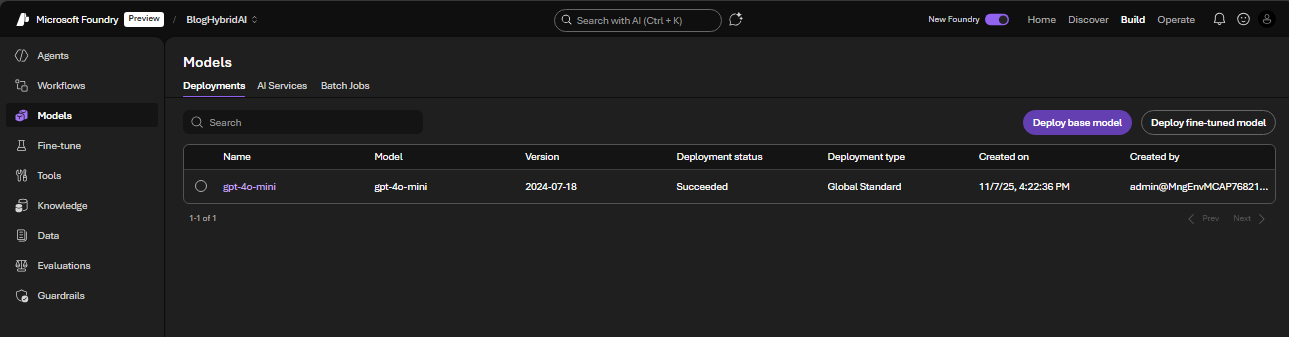
云端侧的关键是创建一个 Microsoft AI Foundry project,以便以托管方式调用云端模型(例如 GPT-4o-mini),并避免额外的部署/服务器配置。Agent Framework 只要指向该 project,完成认证,就可以直接调用云端模型。
一个对混合场景很友好的点是:Microsoft Foundry 与 Foundry Local 采用相同风格的 API。调用云端模型与调用本地模型的请求形式非常相似,因此 agent 不需要两套完全不同的逻辑;只要在需要时切换“该用本地还是云端”即可。
混合工作流“内部实现”拆解
Agent Framework:云端症状检查器指令
原文的 agent 侧代码使用 Agent Framework 的库,并通过一段指令(instructions)约束云端模型的行为:强调非紧急分诊、先做危险信号筛查、用通俗语言输出、以及当检测到化验单文本时必须先调用本地工具做结构化摘要。
from agent_framework import ChatAgent, ai_function
from agent_framework.azure import AzureAIAgentClient
from azure.identity.aio import AzureCliCredential

# ========= Cloud Symptom Checker Instructions =========

SYMPTOM_CHECKER_INSTRUCTIONS = """
You are a careful symptom-checker assistant for non-emergency triage.

General behavior:
- You are NOT a clinician. Do NOT provide medical diagnosis or prescribe treatment.
- First, check for red-flag symptoms (e.g., chest pain, trouble breathing, severe bleeding, stroke signs,
  one-sided weakness, confusion, fainting). If any are present, advise urgent/emergency care and STOP.
- If no red-flags, summarize key factors (age group, duration, severity), then provide:
  1) sensible next steps a layperson could take,
  2) clear guidance on when to contact a clinician,
  3) simple self-care advice if appropriate.
- Use plain language, under 8 bullets total.
- Always end with: "This is not medical advice."

Tool usage:
- When the user provides raw lab report text, or mentions “labs below” or “see labs”,
  you MUST call the `summarize_lab_report` tool to convert the labs into structured data
  before giving your triage guidance.
- Use the tool result as context, but do NOT expose the raw JSON directly.
  Instead, summarize the key abnormal findings in plain language.
""".strip()
让本地模型输出结构化 JSON(本地化验摘要器)
为了确保敏感的“原始化验文本”只在本地处理,原文给本地模型设置了更强约束的 system prompt:要求它把化验单文本抽取为一个 JSON(只包含化验结果与异常项),并禁止输出任何多余解释。
# ========= Local Lab Summarizer (Foundry Local + Phi-4-mini) =========

FOUNDRY_LOCAL_BASE = "http://127.0.0.1:52403"      # from `foundry service status`
FOUNDRY_LOCAL_CHAT_URL = FOUNDRY_LOCAL_BASE + "/v1/chat/completions"

# This is the model id you confirmed works:
FOUNDRY_LOCAL_MODEL_ID = "Phi-4-mini-instruct-cuda-gpu:5"

LOCAL_LAB_SYSTEM_PROMPT = """
You are a medical lab report summarizer running locally on the user's machine.

You MUST respond with ONLY one valid JSON object. Do not include any explanation,
backticks, markdown, or text outside the JSON. The JSON must have this shape:

{
  "overall_assessment": "<short plain English summary>",
  "notable_abnormal_results": [
    {
      "test": "string",
      "value": "string",
      "unit": "string or null",
      "reference_range": "string or null",
      "severity": "mild|moderate|severe"
    }
  ]
}

If you are unsure about a field, use null. Do NOT invent values.
""".strip()
用 @ai_function 把本地推理包装成工具
接下来,原文把本地 Foundry 推理封装为一个 Agent Framework tool(@ai_function)。这一步不是“为了好看”,而是混合架构的关键实践:
- 把本地 GPU 推理暴露为一个明确的工具接口,云端 agent 可以决定何时调用、如何传参,并直接消费返回 JSON。
- 将“原始化验文本”的处理严格限制在本地工具函数边界内,避免进入云端对话上下文。
- 让整个工作流更可维护、可测试、也更符合安全边界划分。
对应示例代码如下(保留原文代码与注释):
@ai_function(
    name="summarize_lab_report",
    description=(
        "Summarize a raw lab report into structured abnormalities using a local model "
        "running on the user's GPU. Use this whenever the user provides lab results as text."
    ),
)
def summarize_lab_report(
    lab_text: Annotated[str, Field(description="The raw text of the lab report to summarize.")],
) -> Dict[str, Any]:
    """
    Tool: summarize a lab report using Foundry Local (Phi-4-mini) on the user's GPU.

    Returns a JSON-compatible dict with:
    - overall_assessment: short text summary
    - notable_abnormal_results: list of abnormal test objects
    """

    payload = {
        "model": FOUNDRY_LOCAL_MODEL_ID,
        "messages": [
            {"role": "system", "content": LOCAL_LAB_SYSTEM_PROMPT},
            {"role": "user", "content": lab_text},
        ],
        "max_tokens": 256,
        "temperature": 0.2,
    }

    headers = {
        "Content-Type": "application/json",
    }

    print(f"[LOCAL TOOL] POST {FOUNDRY_LOCAL_CHAT_URL}")
    resp = requests.post(
        FOUNDRY_LOCAL_CHAT_URL,
        headers=headers,
        data=json.dumps(payload),
        timeout=120,
    )

    resp.raise_for_status()
    data = resp.json()

    # OpenAI-compatible shape: choices[0].message.content
    content = data["choices"][0]["message"]["content"]

    # Handle string vs list-of-parts
    if isinstance(content, list):
        content_text = "".join(
            part.get("text", "") for part in content if isinstance(part, dict)
        )
    else:
        content_text = content

    print("[LOCAL TOOL] Raw content from model:")
    print(content_text)

    # Strip ```json fences if present, then parse JSON
    cleaned = _strip_code_fences(content_text)
    lab_summary = json.loads(cleaned)
    print("[LOCAL TOOL] Parsed lab summary JSON:")
    print(json.dumps(lab_summary, indent=2))

    # Return dict – Agent Framework will serialize this as the tool result
    return lab_summary
示例病例、化验单与提示词
原文示例中的病人/医生/机构信息均为虚构,仅用于演示。
为了更清晰地展示工具路由模式,示例代码把“病例描述”和“化验单原始文本”拼接成一个用户消息交给 agent。在生产系统里,这些输入通常来自 UI 或 API。
# Example free-text case + raw lab text that the agent can decide to send to the tool
    case = (
        "Teenager with bad headache and throwing up. Fever of 40C and no other symptoms."
    )

    lab_report_text = """
   -------------------------------------------
   AI Land FAMILY LABORATORY SERVICES
        4420 Camino Del Foundry, Suite 210
             Gpuville, CA 92108
         Phone: (123) 555-4821  |  Fax: (123) 555-4822
    -------------------------------------------

    PATIENT INFORMATION
    Name:       Frontier Model
    DOB:        04/12/2007 (17 yrs)
    Sex:        Male
    Patient ID: AXT-442871
    Address:    1921 MCP Court, CA 01100

    ORDERING PROVIDER
    Dr. Bot, MD
    NPI: 1780952216
    Clinic: Phi Pediatrics Group

    REPORT DETAILS
    Accession #: 24-SDFLS-118392
    Collected:   11/14/2025 14:32
    Received:    11/14/2025 16:06
    Reported:    11/14/2025 20:54
    Specimen:    Whole Blood (EDTA), Serum Separator Tube

    ------------------------------------------------------
    COMPLETE BLOOD COUNT (CBC)
    ------------------------------------------------------
    WBC ................. 14.5     x10^3/µL      (4.0 – 10.0)     HIGH
    RBC ................. 4.61     x10^6/µL      (4.50 – 5.90)
    Hemoglobin .......... 13.2     g/dL          (13.0 – 17.5)    LOW-NORMAL
    Hematocrit .......... 39.8     %             (40.0 – 52.0)    LOW
    MCV ................. 86.4     fL            (80 – 100)
    Platelets ........... 210      x10^3/µL      (150 – 400)

    ------------------------------------------------------
    INFLAMMATORY MARKERS
    ------------------------------------------------------
    C-Reactive Protein (CRP) ......... 60 mg/L       (< 5 mg/L)     HIGH
    Erythrocyte Sedimentation Rate ... 32 mm/hr      (0 – 15 mm/hr) HIGH

    ------------------------------------------------------
    BASIC METABOLIC PANEL (BMP)
    ------------------------------------------------------
    Sodium (Na) .............. 138   mmol/L       (135 – 145)
    Potassium (K) ............ 3.9   mmol/L       (3.5 – 5.1)
    Chloride (Cl) ............ 102   mmol/L       (98 – 107)
    CO2 (Bicarbonate) ........ 23    mmol/L       (22 – 29)
    Blood Urea Nitrogen (BUN)  11    mg/dL        (7 – 20)
    Creatinine ................ 0.74 mg/dL        (0.50 – 1.00)
    Glucose (fasting) ......... 109  mg/dL        (70 – 99)        HIGH

    ------------------------------------------------------
    LIVER FUNCTION TESTS
    ------------------------------------------------------
    AST ....................... 28  U/L          (0 – 40)
    ALT ....................... 22  U/L          (0 – 44)
    Alkaline Phosphatase ...... 144 U/L          (65 – 260)
    Total Bilirubin ........... 0.6 mg/dL        (0.1 – 1.2)

    ------------------------------------------------------
    NOTES
    ------------------------------------------------------
    Mild leukocytosis and elevated inflammatory markers (CRP, ESR) may indicate an acute
    infectious or inflammatory process. Glucose slightly elevated; could be non-fasting.

    ------------------------------------------------------
    END OF REPORT
    SDFLS-CLIA ID: 05D5554973
    This report is for informational purposes only and not a diagnosis.
------------------------------------------------------

    """

    # Single user message that gives both the case and labs.
    # The agent will see that there are labs and call summarize_lab_report() as a tool.
    user_message = (
        "Patient case:\n"
        f"{case}\n\n"
        "Here are the lab results as raw text. If helpful, you can summarize them first:\n"
        f"{lab_report_text}\n\n"
        "Please provide non-emergency triage guidance."
    )
混合 Agent 代码:把工具与云端模型串起来
到这一步,本地工具(对接 Foundry Local)已经就绪,云端模型(Azure AI Foundry)访问也已配置完成。关键点在 main():Agent Framework 把二者绑定在同一个 workflow 里。
agent 在本地运行,收到同时包含“症状 + 原始化验单”的消息后,会决定是否调用本地工具;化验单会在本机 GPU 上被摘要成结构化 JSON,然后只有 JSON(或其摘要含义)会被交给云端模型做推理与生成。
# ========= Hybrid Main (Agent uses the local tool) =========

async def main():

    ...
    async with (
        AzureCliCredential() as credential,
        ChatAgent(
            chat_client=AzureAIAgentClient(async_credential=credential),
            instructions=SYMPTOM_CHECKER_INSTRUCTIONS,
            # 👇 Tool is now attached to the agent
            tools=[summarize_lab_report],
            name="hybrid-symptom-checker",
        ) as agent,
    ):
        result = await agent.run(user_message)

        print("\n=== Symptom Checker (Hybrid: Local Tool + Cloud Agent) ===\n")
        print(result.text)

if __name__ == "__main__":
    asyncio.run(main())
测试混合 Agent
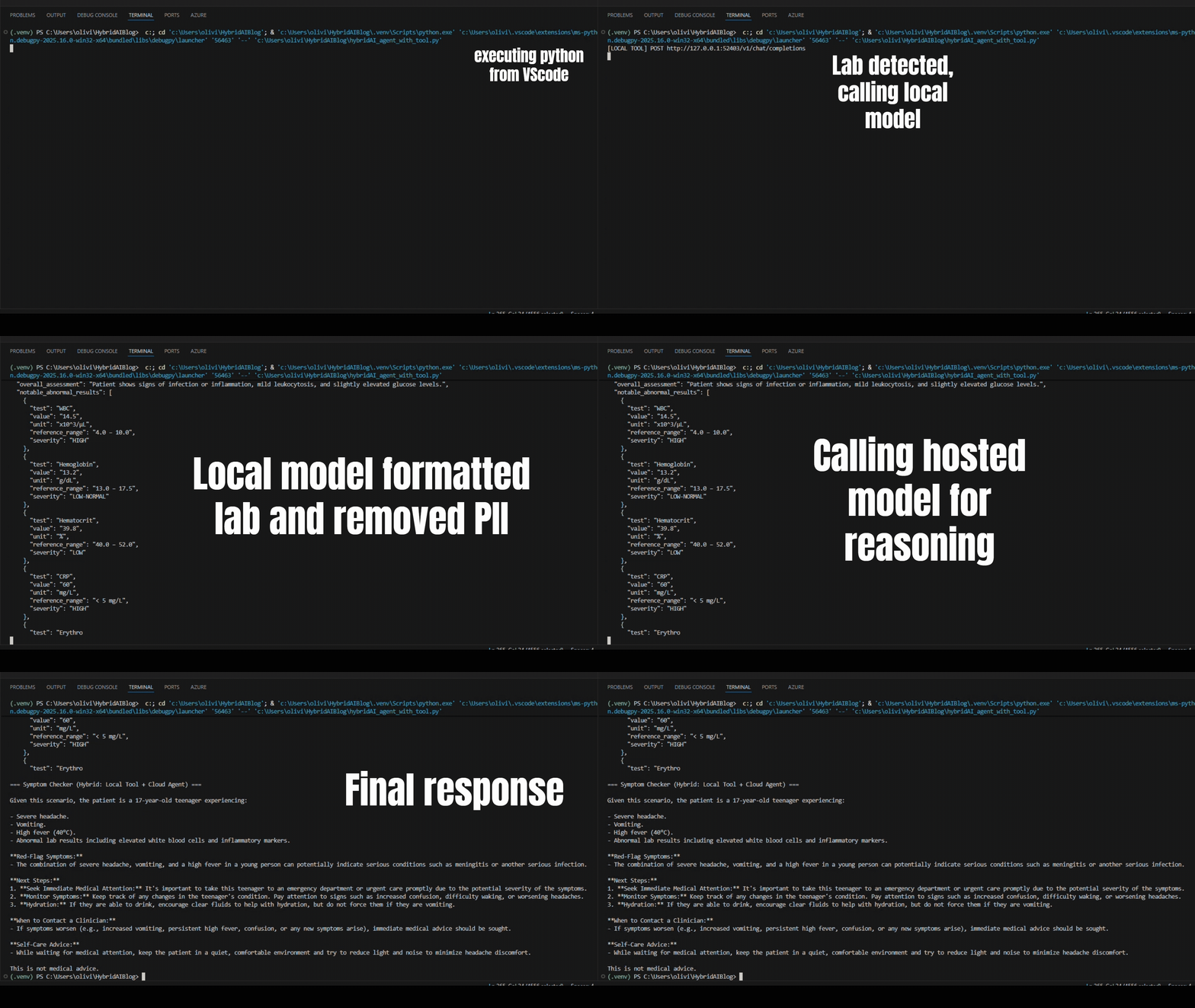
原文示例在 VS Code 中运行 agent,可以观察到:当提交包含化验单的输入时,本地推理会先发生;随后输出被格式化、敏感信息被避免直接传递,云端模型再结合结构化结果与症状描述生成非紧急分诊指导。
下一篇会讲什么
在这个 Part 1 的架构中,agent 在本地运行,并同时调用云端与本地推理。原文预告 Part 2 会展示“反过来的形态”:云端托管的 agent 通过安全网关回调本地 LLM,让运行在边缘设备/桌面/本地机房的工具也能参与云端驱动的工作流,同时仍避免敏感数据外泄。
参考链接
- Agent Framework:https://github.com/microsoft/agent-framework?WT.mc_id=AI-MVP-5003172
- 示例代码仓库:https://github.com/olivierb123/hybrid-ai-foundry-local-demo?WT.mc_id=AI-MVP-5003172
- 本文作者:BeanHsiang
- 本文链接:https://beanhsiang.github.io/post/2025-11-21-hybrid-ai-using-foundry-local-microsoft-foundry-and-the-agent-framework-part-1/
- 版权声明:本作品采用知识共享署名-非商业性使用-禁止演绎 4.0 国际许可协议. 进行许可,非商业转载请注明出处(作者,原文链接),商业转载请联系作者获得授权。