为 Azure Voice Live 构建可用于生产的 SIP 网关
题图来源:Microsoft Tech Community / Microsoft Foundry Blog
引言
语音技术正在重塑人和机器的交互方式,让与 AI 的对话比以往更自然。随着 Voice Live API 的 public beta 发布,开发者拥有了构建低延迟、多模态语音体验的工具,在应用中可以做出很多新玩法。
过去,想做一个语音机器人,往往需要把多个模型“串起来”:比如用 ASR(自动语音识别)模型(像 Whisper)做转写、再用文本模型做推理、最后用 TTS(文本转语音)模型生成语音输出。这条链路通常会带来明显延迟,并且在情感表达等细节上会有损失。
Voice Live API 的关键变化在于:它把这些能力整合到一次 API 调用里。开发者通过建立持久的 WebSocket 连接,就能直接流式传输输入/输出音频,显著降低延迟并提升对话的自然度。同时,API 还支持 function calling,让语音机器人可以在对话过程中即时执行动作(例如下单、查询客户信息等)。
这篇文章从第三方技术博主视角,梳理 Microsoft 团队给出的一个完整方案:一个基于 Python 的 SIP 网关,用来把传统电话/语音系统(SIP/RTP)与 Azure 的 Voice Live 实时对话 API(WebSocket)连接起来。借助这个网关,任何 SIP 端点(座机、软电话、甚至经由 PSTN 转入的来电)都可以与 AI 进行自然的语音对话。
读完本文,你将理解:
- 生产级 SIP-to-WebSocket 网关的整体架构设计
- 音频转码与重采样策略(保证媒体格式无缝转换)
- 真实部署拓扑:云上电话系统与本地企业系统(如 Avaya、Genesys)对接
- 本地测试与企业生产环境的逐步配置指南
架构概览
高层设计
Voice Live API 的工作方式
传统语音助手往往需要链路式组合:ASR(转写)+ 文本模型(推理)+ TTS(合成)。多步骤不仅增加延迟,也更容易丢失对话的“情绪/语气”细节。
Voice Live API 通过一个持续的 WebSocket 连接把这些能力合在一起:可以实时流式输入音频并得到音频输出,从而显著降低端到端延迟,并增强对话的自然感。此外,function calling 让语音机器人可以在对话中主动触发业务动作。
本文的网关在 SIP/RTP(电话语音世界)与 Azure Voice Live 的 WebSocket 实时 API 之间充当 双向媒体代理(bidirectional media proxy):既翻译信令协议,也转换音频格式,从而让传统 VoIP 基础设施与现代 AI 对话代理实现“无感集成”。
关键设计原则
- 异步优先(Asynchronous-First):基于 asyncio 构建非阻塞 I/O,追求低延迟与高并发潜力
- 关注点分离(Separation of Concerns):SIP、媒体、Voice Live 集成分层模块化
- 生产级错误处理:音频队列下溢时,优雅降级(注入静音帧)而不是抖动/掉话
- 结构化日志:使用 structlog 输出可机器解析、带上下文的日志,便于可观测性
- 类型安全:pydantic 校验配置 + mypy 静态检查
核心组件
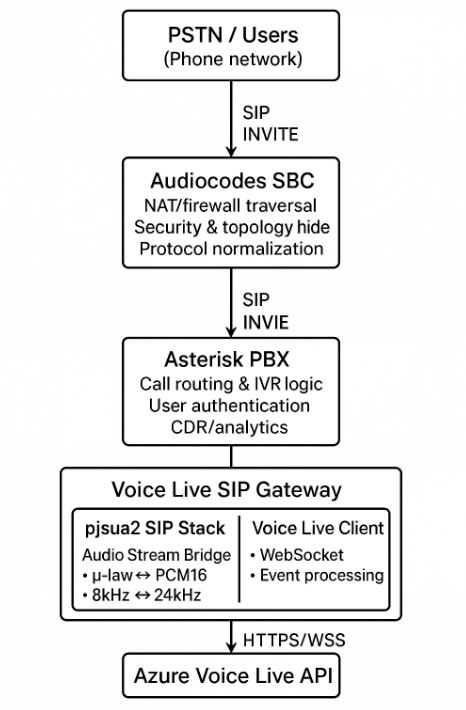
SBC(会话边界控制器)的关键作用:
- 终止运营商侧 SIP,并向 Azure SIP/RTC 端点进行互通
- 规范化 SIP Header、移除不支持的选项、并做编解码映射
- 提供安全能力:TLS 信令、SRTP 媒体、拓扑隐藏、ACL
- 可选做媒体锚定(media anchoring):用于合规录音、QoS 平滑、合法监听等
项目结构
src/voicelive_sip_gateway/
├── config/
│   ├── __init__.py
│   └── settings.py          # Pydantic-based configuration
├── gateway/
│   └── main.py              # Application entry point & lifecycle
├── logging/
│   ├── __init__.py
│   └── setup.py             # Structlog configuration
├── media/
│   ├── __init__.py
│   ├── stream_bridge.py     # Bidirectional audio queue manager
│   └── transcode.py         # μ-law ↔ PCM16 + resampling
├── sip/
│   ├── __init__.py
│   ├── agent.py             # pjsua2 wrapper & call handling
│   ├── rtp.py               # RTP utilities
│   └── sdp.py               # SDP parsing/generation
└── voicelive/
    ├── __init__.py
    ├── client.py            # Azure Voice Live SDK wrapper
    └── events.py            # Event type mapping
呼叫流程(Call Flow)
- 客户拨打你的号码
- Audiocodes SBC 从 PSTN 收到呼叫,并向 Asterisk 转发 SIP INVITE
- Asterisk 的路由逻辑把 INVITE 转到
voicelive-bot@gateway.example.com - Voice Live Gateway 以 SIP 终端方式向 Asterisk 注册并接听
- RTP 音频流:Caller ↔ SBC ↔ Asterisk ↔ Gateway ↔ Azure
音频流水线:从 μ-law 到 PCM16
挑战
传统电话语音常用 G.711 μ-law 编码,采样率 8 kHz(带宽效率高)。而 Azure Voice Live 期望的是 PCM16(16-bit 线性 PCM),采样率 24 kHz。因此网关需要在实时链路中完成:
- 编解码转换(μ-law ↔ PCM16)
- 采样率转换(8 kHz ↔ 24 kHz)
并且要尽可能低延迟。
音频流示意
Caller (SIP)                    Gateway                     Azure Voice Live
─────────────                   ───────                     ────────────────
    │                              │                               │
    │ RTP: μ-law 8kHz              │                               │
    ├──────────────────────────────►                               │
    │                              │                               │
    │                         ┌────▼────┐                          │
    │                         │ pjsua2  │ (decodes to PCM16 8kHz)  │
    │                         └────┬────┘                          │
    │                              │                               │
    │                         ┌────▼────────┐                      │
    │                         │ Resample    │ (8kHz → 24kHz)       │
    │                         │ PCM16       │                      │
    │                         └────┬────────┘                      │
    │                              │                               │
    │                              ├───────────────────────────────►
    │                              │   WebSocket: PCM16 24kHz      │
    │                              │                               │
    │                              │◄──────────────────────────────┤
    │                              │   Response: PCM16 24kHz       │
    │                              │                               │
    │                         ┌────▼────────┐                      │
    │                         │ Resample    │ (24kHz → 8kHz)       │
    │                         │ PCM16       │                      │
    │                         └────┬────────┘                      │
    │                              │                               │
    │                         ┌────▼────┐                          │
    │◄────────────────────────┤ pjsua2  │ (encodes to μ-law)       │
    │  RTP: μ-law 8kHz        └─────────┘                          │
下面挑几个关键代码点,帮助理解端到端的音频流。
音频流桥接:stream_bridge.py
AudioStreamBridge 通过 asyncio 队列来编排双向音频流:
class AudioStreamBridge:
    """Bidirectional audio pump between SIP (μ-law) and Voice Live (PCM16 24kHz)."""

    VOICELIVE_SAMPLE_RATE = 24000
    SIP_SAMPLE_RATE = 8000

    def __init__(self, settings: Settings):
        self._inbound_queue: asyncio.Queue[bytes] = asyncio.Queue()   # SIP → Voice Live
        self._outbound_queue: asyncio.Queue[bytes] = asyncio.Queue()  # Voice Live → SIP
入站链路(Caller → AI):
async def _flush(self) -> None:
    """Process inbound audio: PCM16 8kHz from SIP → PCM16 24kHz to Voice Live."""
    while True:
        pcm16_8k = await self._inbound_queue.get()
        pcm16_24k = resample_pcm16(pcm16_8k, self.SIP_SAMPLE_RATE, self.VOICELIVE_SAMPLE_RATE)
        if self._voicelive_client:
            await self._voicelive_client.send_audio_chunk(pcm16_24k)
出站链路(AI → Caller):
async def emit_audio_to_sip(self, pcm_chunk: bytes) -> None:
    """Resample Voice Live audio down to 8 kHz PCM frames for SIP playback."""
    pcm_8k = resample_pcm16(pcm_chunk, self.VOICELIVE_SAMPLE_RATE, self.SIP_SAMPLE_RATE)

    # Split into 20ms frames (160 samples @ 8kHz = 320 bytes)
    frame_size_bytes = 320
    for offset in range(0, len(pcm_8k), frame_size_bytes):
        frame = pcm_8k[offset : offset + frame_size_bytes]
        if frame:
            await self._outbound_queue.put(frame)
帧时序(Frame Timing):VoIP 常用 20ms 帧(ptime=20)。在 8 kHz 下:8000 samples/sec × 0.020 sec = 160 samples = 320 bytes(PCM16)。
使用 pjsua2 处理 SIP 信令
为什么选 pjsua2?
pjproject 基本算是 SIP/RTP 的“工业标准”,很多商业产品(包括 Asterisk)都在用。pjsua2 提供的 API 具备:
- 完整 SIP 协议栈(INVITE、ACK、BYE、REGISTER 等)
- RTP/RTCP 媒体处理
- 内置多种编解码(G.711、G.722、Opus 等)
- NAT 穿透(STUN/TURN/ICE)
- 线程安全的 C++ API + Python bindings
自定义媒体端口(Custom Media Ports)
为了把 pjsua2 的媒体管线与 asyncio 队列桥接起来,需要实现自定义的 AudioMediaPort 子类。
接收来电音频(Caller → Voice Live)
def onFrameReceived(self, frame: pj.MediaFrame) -> None:
    """Called by pjsua when it receives audio from caller (to Voice Live)."""
    if self._direction == "to_voicelive" and self._loop:
        if frame.type == pj.PJMEDIA_FRAME_TYPE_AUDIO and frame.buf:
            try:
                asyncio.run_coroutine_threadsafe(
                    self._bridge.enqueue_sip_audio(bytes(frame.buf)),
                    self._loop
                )
            except Exception as e:
                self._logger.warning("media.enqueue_failed", error=str(e))
线程模型注意点:pjsua2 的事件循环运行在专用线程里,示例用 asyncio.run_coroutine_threadsafe() 把音频数据安全地投递回主 asyncio loop。
向来电方发送音频(Voice Live → Caller)
def onFrameRequested(self, frame: pj.MediaFrame) -> None:
    """Called by pjsua when it needs audio to send to caller (from Voice Live)."""
    if self._direction == "from_voicelive" and self._loop:
        try:
            future = asyncio.run_coroutine_threadsafe(
                self._bridge.dequeue_sip_audio_nonblocking(),
                self._loop
            )
            pcm_data = future.result(timeout=0.050)

            # Ensure exactly 320 bytes (160 samples @ 8kHz)
            if len(pcm_data) != 320:
                pcm_data = (pcm_data + b'\x00' * 320)[:320]

            frame.type = pj.PJMEDIA_FRAME_TYPE_AUDIO
            frame.buf = pj.ByteVector(pcm_data)
            frame.size = len(pcm_data)
        except Exception:
            # Return silence on timeout/error
            frame.type = pj.PJMEDIA_FRAME_TYPE_AUDIO
            frame.buf = pj.ByteVector(b'\x00' * 320)
            frame.size = 320
优雅降级(Graceful Degradation):如果出站队列为空(AI 还没生成音频),就注入静音帧,避免 RTP 抖动/断续。
呼叫状态管理(Call State Management)
class GatewayCall(pj.Call):
    """Handles SIP call lifecycle and connects media bridge."""

    def onCallState(self, prm: pj.OnCallStateParam) -> None:
        ci = self.getInfo()
        self._logger.info("sip.call_state", remote_uri=ci.remoteUri, state=ci.stateText)

        if ci.state == pj.PJSIP_INV_STATE_DISCONNECTED:
            self._cleanup()
            self._account.current_call = None

    def onCallMediaState(self, prm: pj.OnCallMediaStateParam) -> None:
        ci = self.getInfo()
        for mi in ci.media:
            if mi.type == pj.PJMEDIA_TYPE_AUDIO and mi.status == pj.PJSUA_CALL_MEDIA_ACTIVE:
                media = self.getMedia(mi.index)
                aud_media = pj.AudioMedia.typecastFromMedia(media)

                # Create bidirectional media bridge
                self._to_voicelive_port = CustomAudioMediaPort(self._bridge, "to_voicelive", self._logger)
                self._from_voicelive_port = CustomAudioMediaPort(self._bridge, "from_voicelive", self._logger)

                # Connect: Caller → to_voicelive_port → Voice Live
                aud_media.startTransmit(self._to_voicelive_port)
                # Connect: Voice Live → from_voicelive_port → Caller
                self._from_voicelive_port.startTransmit(aud_media)

                # Start AI conversation with greeting
                asyncio.run_coroutine_threadsafe(
                    self._voicelive_client.request_response(interrupt=False),
                    self._loop
                )
账户注册(Account Registration)
在与 Asterisk 组合的生产部署中,网关需要像标准 SIP 终端一样向 PBX 注册:
class SipAgent:
    def _run_pjsua_thread(self, loop: asyncio.AbstractEventLoop) -> None:
        self._ep = pj.Endpoint()
        self._ep.libCreate()
        self._ep.libInit(ep_cfg)
        self._ep.transportCreate(pj.PJSIP_TRANSPORT_UDP, transport_cfg)
        self._ep.libStart()

        self._account = GatewayAccount(self._logger, self._bridge, self._voicelive_client, loop)

        if self._settings.sip.register_with_server and self._settings.sip.server:
            acc_cfg = pj.AccountConfig()
            acc_cfg.idUri = f"sip:{self._settings.sip.user}@{self._settings.sip.server}"
            acc_cfg.regConfig.registrarUri = f"sip:{self._settings.sip.server}"

            # Digest authentication credentials
            cred = pj.AuthCredInfo()
            cred.scheme = "digest"
            cred.realm = self._settings.sip.auth_realm or "*"
            cred.username = self._settings.sip.auth_user
            cred.data = self._settings.sip.auth_password
            cred.dataType = pj.PJSIP_CRED_DATA_PLAIN_PASSWD
            acc_cfg.sipConfig.authCreds.append(cred)

            self._account.create(acc_cfg)
Voice Live 集成
Azure Voice Live 概览
Azure Voice Live 是一个 实时、双向的对话式 AI 服务,把下面能力整合到一起:
- GPT-4o Realtime Preview:面向口语对话优化的超低延迟语言模型
- 流式语音识别:连续转写,并提供词级时间戳
- 神经 TTS:更自然的合成声音,并具备情感表达
- 服务端 VAD:通过语音活动检测(VAD)做自动轮次切换,无需额外提示词
客户端实现:client.py
class VoiceLiveClient:
    """Manages lifecycle of an Azure Voice Live WebSocket connection."""

    async def connect(self) -> None:
        if self._settings.azure.api_key:
            credential = AzureKeyCredential(self._settings.azure.api_key)
        else:
            # Use AAD authentication (Managed Identity or Service Principal)
            self._aad_credential = DefaultAzureCredential()
            credential = await self._aad_credential.__aenter__()

        self._connection_cm = connect(
            endpoint=self._settings.azure.endpoint,
            credential=credential,
            model=self._settings.azure.model,
        )
        self._connection = await self._connection_cm.__aenter__()

        # Configure session parameters
        session = RequestSession(
            model="gpt-4o",
            modalities=[Modality.TEXT, Modality.AUDIO],
            instructions=self._settings.azure.instructions,
            input_audio_format=InputAudioFormat.PCM16,
            output_audio_format=OutputAudioFormat.PCM16,
            input_audio_transcription=AudioInputTranscriptionOptions(model="azure-speech"),
            turn_detection=ServerVad(
                threshold=0.5,
                prefix_padding_ms=200,
                silence_duration_ms=400
            ),
            voice=AzureStandardVoice(name=self._settings.azure.voice)
        )
        await self._connection.session.update(session=session)
关键配置点:
turn_detection=ServerVad(...):由 Azure 判断用户何时停止说话,并自动触发 AI 生成响应;无需唤醒词或显式提示prefix_padding_ms=200:保留语音检测前 200ms 音频,避免截断过硬silence_duration_ms=400:检测到 400ms 静音后认定轮次结束
流式响应音频:AI 生成的语音会以 RESPONSE_AUDIO_DELTA 事件分片到达(base64 编码的 PCM16 chunks)。网关解码后立即通过音频桥接下发,实现低延迟播放。
生产部署:Audiocodes + Asterisk
为什么选择这种拓扑?
| 组件 | 角色 | 收益 |
|---|---|---|
| Audiocodes SBC | 会话边界控制器 | - NAT/防火墙穿透 - 安全(DOS 防护、加密) - 协议规范化 - 拓扑隐藏 - 媒体锚定(可选转码) |
| Asterisk PBX | SIP 服务器 | - 呼叫路由与 IVR - 用户目录与鉴权 - 转接/保持/会议等高级呼叫能力 - CDR/分析 - 与企业电话系统集成 |
| Voice Live Gateway | AI 对话端点 | - 实时 AI 对话 - 自然语言理解 - 动态响应生成 - 多语言支持 |
网络架构
                    Internet
                       │
                       │ SIP/RTP
                       ▼
         ┌─────────────────────────┐
         │   Audiocodes SBC        │
         │   Public IP: X.X.X.X    │
         │   Ports: 5060, 10000+   │
         └────────────┬────────────┘
                      │ Private Network
         ┌────────────▼────────────┐
         │   Asterisk PBX          │
         │   Internal: 10.0.1.10   │
         │   Port: 5060            │
         └────────────┬────────────┘
                      │
         ┌────────────▼────────────┐
         │  Voice Live Gateway     │
         │  Internal: 10.0.1.20    │
         │  Port: 5060             │
         │  ┌───────────────────┐  │
         │  │ Outbound HTTPS    │  │
         │  │ to Azure          │  │
         │  └─────────┬─────────┘  │
         └────────────┼────────────┘
                      │ Internet (HTTPS/WSS)
                      ▼
         ┌────────────────────────┐
         │  Azure Voice Live API  │
         │  *.cognitiveservices   │
         └────────────────────────┘
Audiocodes SBC 配置
1. 到 Asterisk 的 SIP Trunk(IP Group)
IP Group Settings:
- Name: Asterisk-Trunk
- Type: Server
- SIP Group Name: asterisk.internal.example.com
- Media Realm: Private
- Proxy Set: Asterisk-ProxySet
- Classification: Classify by Proxy Set
- SBC Operation Mode: SBC-Only
- Topology Location: Internal Network
2. Asterisk 的 Proxy Set
Proxy Set Name: Asterisk-ProxySet
Proxy Address: 10.0.1.10:5060
Transport Type: UDP
Load Balancing Method: Parking Lot
3. IP-to-IP 路由规则
Rule Name: PSTN-to-Gateway
Source IP Group: PSTN-Trunk
Destination IP Group: Asterisk-Trunk
Call Trigger: Any
Destination Prefix Manipulation: None
Message Manipulation: None
4. 媒体设置
Media Realm: Private
IPv4 Interface: LAN1 (10.0.1.1)
Media Security: None (or SRTP if required)
Codec Preference Order: G711Ulaw, G711Alaw
Transcoding: Disabled (pass-through)
RTP Port Range: 10000-20000
Asterisk 配置
/etc/asterisk/pjsip.conf
;=====================================
; Transport Configuration
;=====================================
[transport-udp]
type=transport
protocol=udp
bind=0.0.0.0:5060
local_net=10.0.0.0/8

;=====================================
; Voice Live Gateway Endpoint
;=====================================
[voicelive-gateway]
type=endpoint
context=voicelive-routing
aors=voicelive-gateway
auth=voicelive-auth
disallow=all
allow=ulaw
allow=alaw
direct_media=no
force_rport=yes
rewrite_contact=yes
rtp_symmetric=yes
ice_support=no

[voicelive-gateway]
type=aor
contact=sip:10.0.1.20:5060
qualify_frequency=30

[voicelive-auth]
type=auth
auth_type=userpass
username=
password=
realm=sip.example.com

;=====================================
; SBC Trunk (for inbound calls)
;=====================================
[audiocodes-sbc]
type=endpoint
context=from-sbc
aors=audiocodes-sbc
disallow=all
allow=ulaw
allow=alaw

[audiocodes-sbc]
type=aor
contact=sip:10.0.1.1:5060
/etc/asterisk/extensions.conf
;=====================================
; Incoming calls from SBC
;=====================================
[from-sbc]
; Example: Route calls to 800-AI-VOICE to the gateway
exten => 8002486423,1,NoOp(Routing to Voice Live Gateway)
 same => n,Set(CALLERID(name)=AI Assistant)
 same => n,Dial(PJSIP/voicelive-bot@voicelive-gateway,30)
 same => n,Hangup()

; Default handler for unmatched numbers
exten => _X.,1,NoOp(Unrouted call: ${EXTEN})
 same => n,Playback(invalid)
 same => n,Hangup()

;=====================================
; Voice Live Gateway routing context
;=====================================
[voicelive-routing]
exten => _X.,1,NoOp(Call from gateway: ${CALLERID(num)})
 same => n,Hangup()
网关配置
创建 /opt/voicelive-gateway/.env:
#=====================================
# SIP Configuration
#=====================================
SIP_SERVER=asterisk.internal.example.com
SIP_PORT=5060
SIP_USER=voicelive-bot@sip.example.com
AUTH_USER=voicelive-bot
AUTH_REALM=sip.example.com
AUTH_PASSWORD=
REGISTER_WITH_SIP_SERVER=true
DISPLAY_NAME=Voice Live Bot

#=====================================
# Network Configuration
#=====================================
SIP_LOCAL_ADDRESS=0.0.0.0
SIP_VIA_ADDR=10.0.1.20
MEDIA_ADDRESS=10.0.1.20
MEDIA_PORT=10000
MEDIA_PORT_COUNT=1000

#=====================================
# Azure Voice Live
#=====================================
AZURE_VOICELIVE_ENDPOINT=wss://xxxxxx.cognitiveservices.azure.com/openai/realtime
AZURE_VOICELIVE_API_KEY=
VOICE_LIVE_MODEL=gpt-4o
VOICE_LIVE_VOICE=en-US-AvaNeural
VOICE_LIVE_INSTRUCTIONS=You are a helpful customer service assistant for Contoso Inc. Answer questions about account balances, order status, and general inquiries. Be friendly and concise.
VOICE_LIVE_MAX_RESPONSE_OUTPUT_TOKENS=200
VOICE_LIVE_PROACTIVE_GREETING_ENABLED=true
VOICE_LIVE_PROACTIVE_GREETING=Thank you for calling Contoso customer service. How can I help you today?

#=====================================
# Logging
#=====================================
LOG_LEVEL=INFO
VOICE_LIVE_LOG_FILE=/var/log/voicelive-gateway/gateway.log
Systemd 服务(Linux)
创建 /etc/systemd/system/voicelive-gateway.service:
[Unit]
Description=Voice Live SIP Gateway
After=network.target

[Service]
Type=simple
User=voicelive
Group=voicelive
WorkingDirectory=/opt/voicelive-gateway
EnvironmentFile=/opt/voicelive-gateway/.env
ExecStart=/opt/voicelive-gateway/.venv/bin/python3 -m voicelive_sip_gateway.gateway.main
Restart=on-failure
RestartSec=10
StandardOutput=journal
StandardError=journal

# Security hardening
NoNewPrivileges=true
PrivateTmp=true
ProtectSystem=strict
ReadWritePaths=/var/log/voicelive-gateway

[Install]
WantedBy=multi-user.target
启用并启动:
sudo systemctl daemon-reload sudo systemctl enable voicelive-gateway sudo systemctl start voicelive-gateway sudo systemctl status voicelive-gateway
配置指南
环境变量参考
| Variable | Description | Example | Required |
|---|---|---|---|
| Azure Voice Live | |||
| AZURE_VOICELIVE_ENDPOINT | WebSocket endpoint URL | wss://myresource.cognitiveservices.azure.com/openai/realtime | ✅ |
| AZURE_VOICELIVE_API_KEY | API key (or use AAD) | abc123… | ✅* |
| VOICE_LIVE_MODEL | Model identifier | gpt-4o | ❌ (default: gpt-4o) |
| VOICE_LIVE_VOICE | TTS voice name | en-US-AvaNeural | ❌ |
| VOICE_LIVE_INSTRUCTIONS | System prompt | You are a helpful assistant | ❌ |
| VOICE_LIVE_MAX_RESPONSE_OUTPUT_TOKENS | Max tokens per response | 200 | ❌ |
| VOICE_LIVE_PROACTIVE_GREETING_ENABLED | Enable greeting on connect | true | ❌ |
| VOICE_LIVE_PROACTIVE_GREETING | Greeting message | Hello! How can I help? | ❌ |
| SIP Configuration | |||
| SIP_SERVER | Asterisk/PBX hostname | asterisk.example.com | ✅** |
| SIP_PORT | SIP port | 5060 | ❌ (default: 5060) |
| SIP_USER | SIP user URI | bot@sip.example.com | ✅** |
| AUTH_USER | Auth username | bot | ✅** |
| AUTH_REALM | Auth realm | sip.example.com | ✅** |
| AUTH_PASSWORD | Auth password | securepass | ✅** |
| REGISTER_WITH_SIP_SERVER | Enable registration | true | ❌ (default: false) |
| DISPLAY_NAME | Caller ID name | Voice Live Bot | ❌ |
| Network Settings | |||
| SIP_LOCAL_ADDRESS | Local bind address | 0.0.0.0 | ❌ (default: 127.0.0.1) |
| SIP_VIA_ADDR | Via header IP | 10.0.1.20 | ❌ |
| MEDIA_ADDRESS | RTP bind address | 10.0.1.20 | ❌ |
| MEDIA_PORT | RTP port range start | 10000 | ❌ |
| MEDIA_PORT_COUNT | RTP port range count | 1000 | ❌ |
| Logging | |||
| LOG_LEVEL | Log verbosity | INFO | ❌ (default: INFO) |
| VOICE_LIVE_LOG_FILE | Log file path | logs/gateway.log | ❌ |
*Either AZURE_VOICELIVE_API_KEY or AAD environment variables (AZURE_CLIENT_ID, AZURE_TENANT_ID, AZURE_CLIENT_SECRET) are required.
**Required only when REGISTER_WITH_SIP_SERVER=true.
本地测试搭建(Local Testing Setup)
如果你想不依赖 SBC/PBX 基础设施进行快速验证,可以按下面步骤做本地测试。
前置条件(Prerequisites)
- 安装 pjproject 及 Python bindings:
git clone https://github.com/pjsip/pjproject.git?WT.mc_id=AI-MVP-5003172 cd pjproject ./configure CFLAGS="-O2 -DNDEBUG" && make dep && make cd pjsip-apps/src/swig make export PYTHONPATH=$PWD:$PYTHONPATH
- 安装网关依赖:
cd /path/to/azure-voicelive-sip-python python3 -m venv .venv source .venv/bin/activate pip install -e .[dev]
- 安装 PortAudio(可选:用于本机扬声器播放):
# macOS brew install portaudio # Ubuntu/Debian sudo apt-get install portaudio19-dev
本地配置
创建 .env:
# No SIP server - direct connection
REGISTER_WITH_SIP_SERVER=false
SIP_LOCAL_ADDRESS=127.0.0.1
SIP_VIA_ADDR=127.0.0.1
MEDIA_ADDRESS=127.0.0.1

# Azure Voice Live
AZURE_VOICELIVE_ENDPOINT=wss://your-resource.cognitiveservices.azure.com/openai/realtime
AZURE_VOICELIVE_API_KEY=your-api-key

# Logging
LOG_LEVEL=DEBUG
VOICE_LIVE_LOG_FILE=logs/gateway.log
运行网关
# Load environment variables set -a && source .env && set +a # Start gateway make run # Or manually: PYTHONPATH=src python3 -m voicelive_sip_gateway.gateway.main
期望输出(示例):
2025-11-27 10:15:32 [info ] voicelive.connected endpoint=wss://… 2025-11-27 10:15:32 [info ] sip.transport_created port=5060 2025-11-27 10:15:32 [info ] sip.agent_started address=127.0.0.1 port=5060
连接 SIP 软电话(Softphone)
可用的免费 SIP 客户端:
配置软电话(示例):
Account Settings: - Username: test - Domain: 127.0.0.1 - Port: 5060 - Transport: UDP - Registration: Disabled (direct connection) To call: sip:test@127.0.0.1:5060
预期呼叫流程:
- Dial
sip:test@127.0.0.1:5060 - Gateway answers with 200 OK
- Hear AI greeting: “Thank you for calling. How can I help you today?”
- Speak your question
- Hear AI-generated response
延迟预算(Latency Budget)
| Component | Typical Latency | Notes |
|---|---|---|
| Network (caller → gateway) | 10-50ms | Depends on ISP, distance |
| SIP/RTP processing | <5ms | pjproject is highly optimized |
| Audio resampling | <2ms | scipy.resample_poly is efficient |
| WebSocket (gateway → Azure) | 20-80ms | Depends on region, network |
| Voice Live processing | 200-500ms | STT + LLM inference + TTS |
| Total round-trip | 250-650ms | Perceived as near real-time |
优化建议:
- 尽量把网关部署在与 Voice Live 资源相同的 Azure 区域
- 在 Audiocodes SBC 上启用 expedited routing(同时关闭不必要的 media anchoring)
- 尽量减少 SIP hop:简单场景可直接 SBC → Gateway(跳过 Asterisk)
- 监控队列深度:当
_inbound_queue或_outbound_queue超过 10 个 item 时输出警告
关键日志事件(Key Log Events)
| Event | Meaning | Action |
|---|---|---|
| sip.agent_started | Gateway listening | ✅ Normal |
| sip.incoming_call | New call received | ✅ Normal |
| sip.media_active | Audio bridge established | ✅ Normal |
| voicelive.connected | WebSocket connected | ✅ Normal |
| voicelive.audio_delta | AI audio chunk received | ✅ Normal |
| voicelive.event_error | Voice Live API error | ⚠️ Check API key, quota |
| media.enqueue_failed | Audio queue full | ⚠️ CPU overload or slow network |
| sip.thread_error | pjsua crash | 🔴 Restart gateway |
常见问题(Common Issues)
1. 听不到来电方音频
现象:AI 对你的讲话没有响应
诊断:
Check RTP packets arriving sudo tcpdump -i any -n udp port 10000-11000
解决:
- 确认
MEDIA_ADDRESS与网关可达 IP 一致 - 检查防火墙(放行 UDP 10000-11000)
- 确认 Asterisk 配置:
direct_media=no且rtp_symmetric=yes
2. 音频断续/卡顿(Choppy audio)
现象:声音发“机械音”、有明显掉包
诊断:查看日志中的队列深度
解决:
- 增加 CPU 资源
- 降低
VOICE_LIVE_MAX_RESPONSE_OUTPUT_TOKENS,减少生成时间 - 检查网络抖动(目标 <30ms)
3. SIP 注册失败
现象:Asterisk 执行 pjsip show endpoints 显示 Unreachable
诊断:
On Asterisk pjsip set logger on # Watch for REGISTER attempts
解决:
- 核对
AUTH_USER/AUTH_PASSWORD/AUTH_REALM与 Asteriskpjsip.conf一致 - 检查网络连通性:
ping asterisk.example.com - 确认
REGISTER_WITH_SIP_SERVER=true
结语
这套方案给出了一个“生产级桥接器”的参考实现:在电话语音世界与 Azure 的 AI Voice Live 服务之间建立稳定、低延迟的双向媒体通道。文章中强调的成果包括:
✅ 实时音频转码:额外开销 <5ms ✅ 健壮的 SIP 栈:基于工业级 pjproject ✅ 异步架构:具备更高并发潜力 ✅ 企业级部署拓扑:Audiocodes SBC + Asterisk PBX ✅ 可观测性:结构化日志贯穿全链路
下一步(Next Steps)
可以考虑的增强方向:
- 多通话支持:重构为单实例支持多个并发呼叫
- DTMF:实现 RFC 2833,用于 IVR 场景
- 呼叫转接:支持 SIP REFER,把来电转给人工坐席
- 录音与合规:将会话写入 Azure Blob Storage
- 指标体系:输出 Prometheus 指标(时长、错误率、延迟分位数)
- Kubernetes:用 Helm chart 做网关的自动扩缩
- TLS/SRTP:端到端加密 SIP 信令与 RTP 媒体
参考资源
- Azure Voice Live Documentation: https://learn.microsoft.com/azure/ai-services/speech-service/voice-live?WT.mc_id=AI-MVP-5003172
获取代码(Get the Code)
完整源码在 GitHub:
https://github.com/monuminu/azure-voicelive-sip-python?WT.mc_id=AI-MVP-5003172
- 本文作者:BeanHsiang
- 本文链接:https://beanhsiang.github.io/post/2026-01-04-building-a-production-ready-sip-gateway-for-azure-voice-live/
- 版权声明:本作品采用知识共享署名-非商业性使用-禁止演绎 4.0 国际许可协议. 进行许可,非商业转载请注明出处(作者,原文链接),商业转载请联系作者获得授权。